SMARTCART APP
INTRODUCTION
This grocery shopping app was designed to better understand how users plan their meals and grocery trips, what drives impulse purchases, and how leftover ingredients contribute to food waste. The goal is to create a solution that encourages intentional, plan based shopping while reducing unnecessary spending and excess waste. The app helps users organize meals, build smarter grocery lists, track ingredients they already have at home, and easily find the items they need in a clear and accessible way.
This project marks my first time fully implementing user needs and mapping the complete user journey from research to solution. I focused on understanding real behaviors and pain points in order to design features that genuinely support users, translating research insights into a cohesive, user centered digital experience.
OBJECTIVE

I wanted to understand how users currently plan grocery shopping and meals, what leads them to make impulse purchases, and how leftover ingredients contribute to food waste. This objective helped me design a grocery shopping solution that supports efficient plan-based purchasing and reduces waste.
IDEATION TECHNIQUES
I used the SCAMPER technique to help me think of new ways to improve the grocery shopping experience. I asked myself how I could substitute free browsing with a plan first approach, combine meal planning with grocery list building, and adapt tools like budgeting and calendar scheduling into the app. I also thought about modifying ingredient amounts to reduce waste, eliminating duplicate items across recipes, and rearranging the shopping flow to focus on planning before checkout. This helped me come up with practical ideas that reduce impulse buying and make shopping more intentional.

Scamper Technique
I used mind mapping to organize all of my ideas in one clear visual layout. I started with the main goal of plan based grocery shopping and then branched out into features like meal planning, delivery, budgeting, and leftover tracking. This helped me see how different features connect and support each other. It also made it easier to understand user problems and design solutions that work together as one complete, user centered experience.

Mind Mapping
CONTENT AND INFORMATION ORGANIZATION
To organize the content, I grouped meals into clear and helpful categories such as quick meals, budget friendly, plant based, and dietary needs. This made it easier to see how users might search for recipes based on their lifestyle. Organizing the information this way helped me design a system that feels simple, structured, and easy to navigate.

Organization
USER PERSONAS
I created user personas to represent different types of people who might use the app. Each persona has different goals, habits, and challenges, such as being busy, health focused, eco conscious, or budget aware. This helped me design features that support a variety of needs instead of just one type of user. The personas kept my decisions focused on real people and real behaviors throughout the design process.

User Personas
STORYBOARDING
I used storyboarding to walk through the user’s experience step by step. I imagined a user who wants to plan meals but feels unsure about what to cook or buy. The storyboard shows how they open the app, choose meals for the week, reuse ingredients across recipes, and shop with a clear plan. This helped me understand the full journey and design features that support users from confusion to confidence.

Storyboard
LOW-FIDELITY WIREFRAMES
I created low fidelity wireframes to sketch out the basic layout and structure of the app before focusing on design details. These rough screens helped me test the flow between meal planning, list building, and recipe browsing. By keeping them simple, I was able to focus on functionality, navigation, and clarity. This step allowed me to quickly adjust the layout and improve the overall user experience.


Low-Fidelity Wireframes
MID-FIDELITY WIREFRAMES
Using mid-fidelity wireframes during the ideation process is important because it helps determine which layout and structure are most clear and intuitive for users. This stage allows users to test the visual hierarchy before moving into full prototyping, making it easier to identify areas that need improvement. By refining the layout early on, I can ensure the app is more accessible, user friendly, and easy to navigate for everyone.
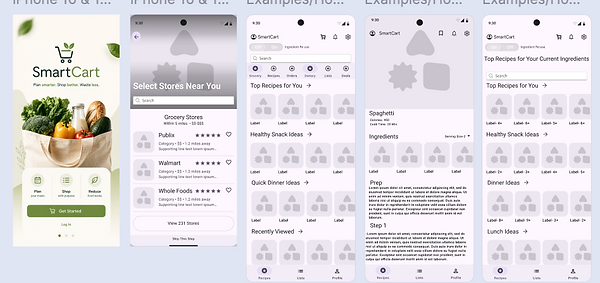
Mid-Fidelity Wireframes
HIGH-FIDELITY WIREFRAMES
Creating a high-fidelity prototype is the final step before development because it transforms the wireframes into a realistic, interactive experience. This stage focuses on visual design, branding, typography, color, spacing, and user interactions to closely represent how the finished application will function. By testing the high-fidelity prototype, I was able to evaluate the overall user experience, identify usability improvements, and ensure the interface was both visually appealing and intuitive. This process helped refine the final design while providing a clear representation of the app before development begins.

High-Fidelity Wireframes
CONCLUSION
Throughout this project, I followed the complete UX/UI design process to create SmartCart, a grocery shopping app focused on helping users plan meals, reduce food waste, and make more intentional purchasing decisions. I began by identifying the problem, conducting research, and defining clear objectives before using ideation techniques to generate potential solutions. I then developed user personas and storyboards to better understand different user needs and map the complete user journey. From there, I created low-, mid-, and high-fidelity wireframes, continuously refining the layout, navigation, and visual design based on usability principles. The final prototype combines research, functionality, and thoughtful design into an intuitive experience that simplifies meal planning, grocery shopping, and ingredient management while encouraging more sustainable shopping habits.